This is the part that replaces the group chat.
Put the event in
Admins create events from Events. Pick the date and the type — rehearsal, contest, concert, whatever your band runs.
Every member can then answer Yes, No or Maybe. It saves the moment they tap it.
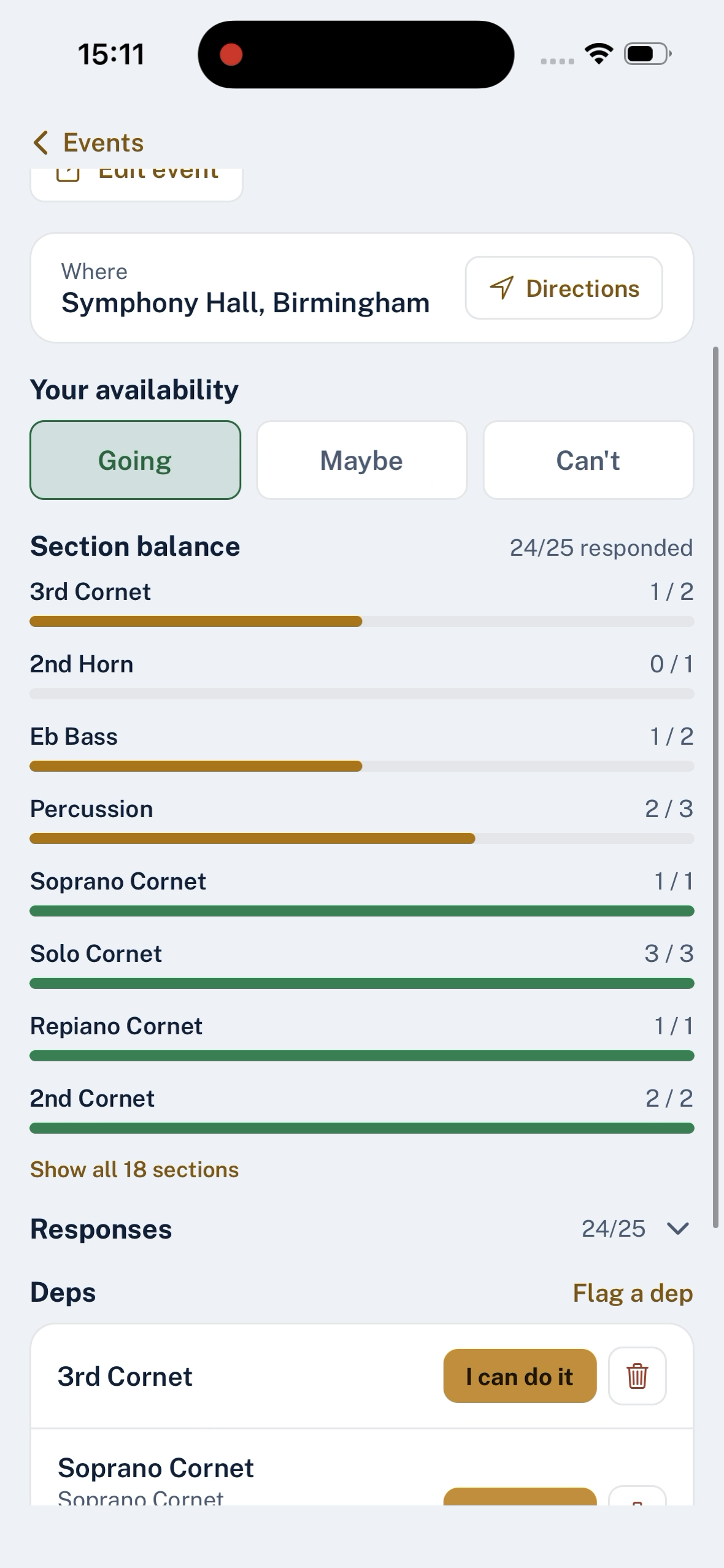
Read the section balance
Underneath the responses is the thing worth having: a coverage bar for each section. It divides the players who said yes by the target you set in Sections, and grades it:
| Reading | What it means |
|---|---|
| Healthy | The section is up to strength for this event |
| Nearly there | Short, but not by much |
| Needs subs | Enough people are missing that you should do something |
Nobody has to count anything. You look at the front row on a Tuesday and you already know whether Saturday works.
Chasing the people who have not answered
The responses list shows who has not replied, and each member has a response reliability figure on their profile — the share of past events they answered, counted from when they joined. It is there to tell you who genuinely never replies, as opposed to who you feel never replies.
You can send a Remind to anyone who has not responded. They get a notification and an email, and see a banner in the app until they answer. Reminders also go out on their own each morning, so the chasing is not another job on your list.
Changing a date or cancelling
Events can be edited and cancelled after they go up. On an event you created, tap Edit event to change the date, time, location or notes; the change goes to everyone who has already replied. To scrub an event entirely, use Cancel event on the same panel — that removes it from the calendar and tells the band it is off, rather than deleting it silently. Cancelled events stay in the history so a member cannot arrive at a hall you have forgotten to warn them about.
Last updated 2026-09-03